How to Check Your Email Statistics?
Tracking and analyzing your data after hitting "Send" is crucial for the success of your email campaigns. Whether you are monitoring delivery health or measuring user engagement, uSpeedo provides a comprehensive suite of analytics to help you understand exactly what happens to your emails once they leave our platform.
By leveraging these insights, you can optimize your sending strategy, improve your sender reputation, and drive better results for your business.
Key Performance Indicators
In your Statistics dashboard, we track several core metrics:
Sent : Total number of email sending requests received by the platform.
Delivered : The number of emails successfully accepted by the recipient's mail server.
Opened : The unique count of recipients who opened your email.
Clicked : The unique count of recipients who clicked on one or more links within your email.
Bounce : Emails that could not be delivered, usually due to a permanent issue with the recipient's mailbox or an invalid address.
Blocked : Emails rejected due to domain reputation, security policies, or ISP restrictions.
Temporary Issues : Emails that failed due to transient reasons, such as rate-limiting or server-side congestion.
Note: These are always emails that could be retried after a short period.
Unsubscribe : The number of recipients who selected out of your mailing list via the unsubscribe link.
Spam Report : The number of recipients who manually marked your email as "Spam." High rates here can significantly impact your future deliverability.
Visualizing Your Data
To help you make sense of the numbers, uSpeedo offers several interactive charts and sections:
1. Email Funnel
This top-down visualization tracks your email's journey from Sent → Delivered → Opened → Clicked . It is the quickest way to identify where you might be losing your audience.
2. Delivery Trend
A comprehensive time-series chart that allows you to monitor fluctuations in your performance over days, weeks, or months. Use this to spot sudden drops in delivery or spikes in engagement.
3. Blocked Failure Analysis
A specialized breakdown of why emails were rejected. This section categorizes "Blocked" reasons by type.
Pro Tip: For a deeper dive into error codes, click Failure Analysis in the top right corner of this block.
4. Daily Aggregation
A tabular view of your data organized by date. This is ideal for auditing daily performance and can be exported for your internal reporting needs.
Step-by-Step Instructions
How to Filter and View Specific Data
Navigate to the Statistics page.
Use the Filters at the top of the page to narrow down your view:
- Time Range: Select the specific dates you want to analyze.
- Email Type: Switch between Transactional (eg, OTPs, receipts) and Marketing emails.
- Sending Domain: Filter by specific domains to compare performance across different parts of your business.
Investigating Individual Email Logs & Failures
If you notice high Bounce or Blocked rates, you can investigate the root cause:
- Go to the Email Logs page.
- Locate the specific record you want to inspect.
- Click the Arrow Icon on the left side of the record to expand the details.
- View the Receipt Description to see the exact reason provided by the recipient's mail server.

Deep Diving into Engagement
To see who is interacting with your content:
- Go to the Engagement Records page.
- Here, you can view specific logs for Opens, Clicks, Unsubscribes, and Spam Reports , including recipient addresses and timestamps.
Advanced Analysis: Failure Analysis
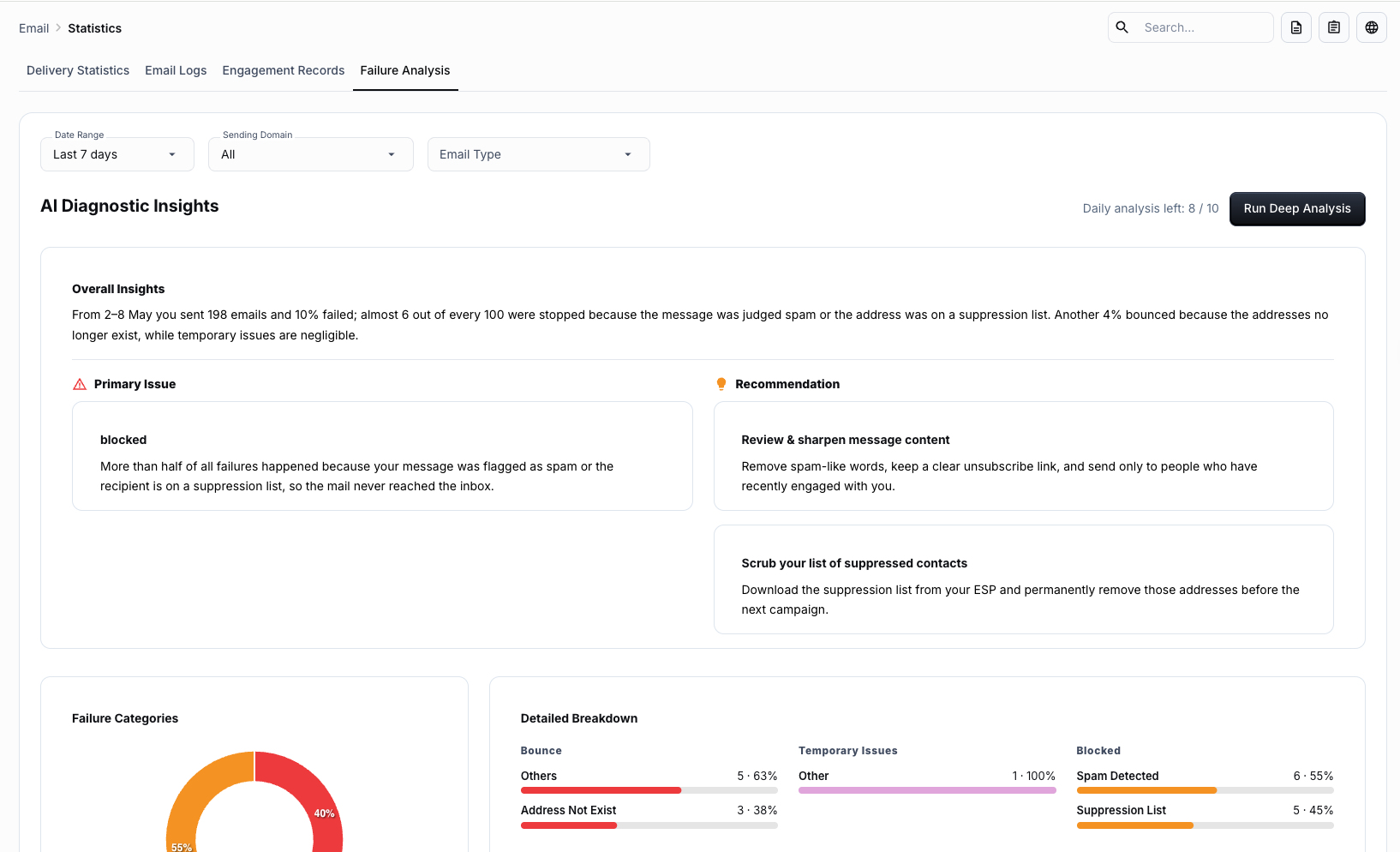
For when you need more than just raw numbers, our Failure Analysis tool provides intelligent diagnostics:
- Deep Analysis: Click Run Deep Analysis to have uSpeedo's AI engine categorize your failures and provide actionable suggestions to fix them.
- Classification & Ranking: See a ranked list of failure reasons so you can prioritize fixing the issues affecting the most users (eg, resolving a specific ISP block).