Accepted Payment Methods
Overview
To provide you with a seamless experience, uSpeedo offers a variety of flexible payment options. Whether you prefer using credit cards, digital wallets, or offline bank transfers, our goal is to ensure your account remains funded so your email campaigns never miss a beat. Currently, we support payments in USD and USDT .
Supported Payment Channels
- Credit Cards and Digital Wallets We support a wide range of international card networks and digital payment methods for instant account top-ups.
- Supported Card Networks: Visa, Mastercard, American Express, JCB, Discover, Diners Club, and China UnionPay (CUP).
- Digital Wallets: Google Pay, Banconnect, iDEAL, and Wero.
- Local Methods: Various local bank cards and regional payment providers are also supported. Important Note: We currently only support Credit Cards . Debit cards (check cards) are not accepted at this time.
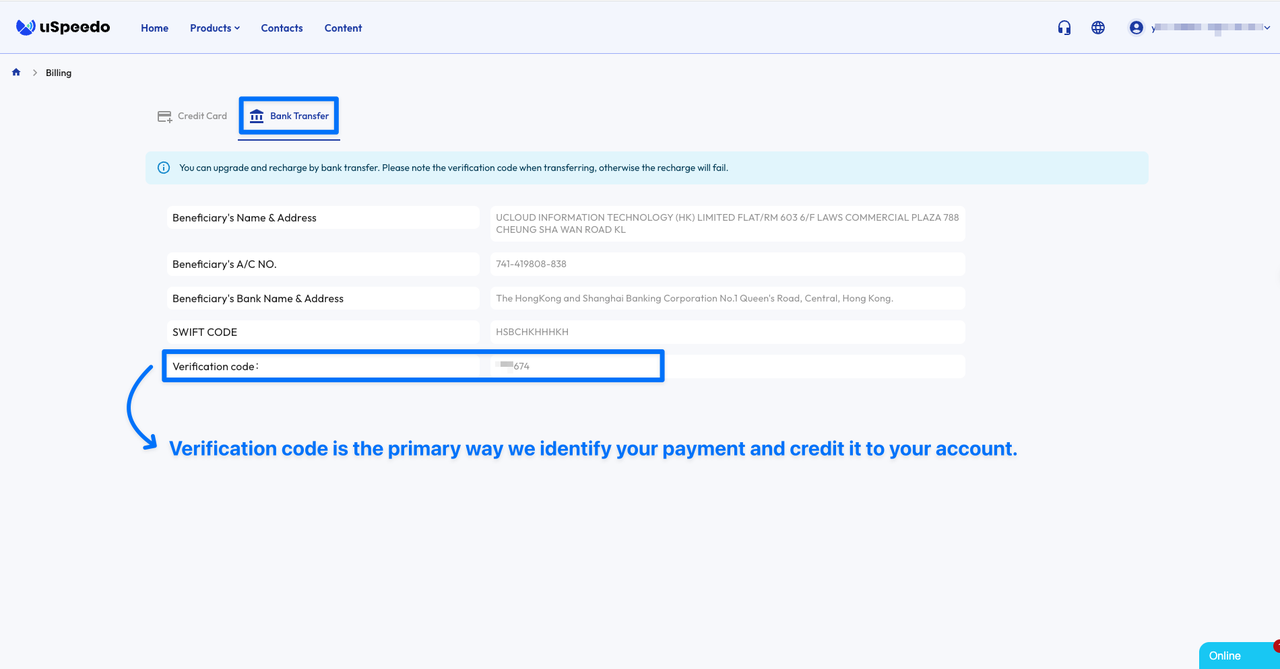
- Offline Bank Transfers For users who prefer traditional banking or need to process larger transactions, we support direct offline transfers.
- Where to find details: Navigate to the "Bank Transfer" section within your billing dashboard to view our specific banking credentials (Account Name, IBAN/Swift, etc.).
- Verification Code: When initiating a transfer, you must include your unique Verification Code in the transaction comments/memo. This code is the primary way we identify your payment and credit it to your account.
- Cryptocurrency (USDT) We recognize the need for decentralized payment options and accept USDT .
- To pay via USDT, please contact our Support Team via support@mail-uspeedo.com directly for the most current wallet addresses and exchange rate confirmations.
How to Make a Payment
- Log in to your uSpeedo account.
- Navigate to the Billing section.
- Select your preferred method.
- Follow the on-screen prompts to complete the transaction.
- For Credit Cards: Enter your card details and confirm.
- For Bank Transfers: Note the bank details and your unique Verification Code, then process the transfer through your banking portal.
Notice
- Authorization: By providing your card information, you authorize UCLOUD INFORMATION TECHNOLOGY (HK) LIMITED to charge future payments from your card in accordance with our Terms of Service.
- Double-Check the Memo: When doing a bank transfer, failing to include the Verification Code can lead to significant delays in manual auditing.
- Currency Conversion: While we accept USD, your local bank may charge a conversion fee if your primary bank account is in another currency.